5.1.1-connection-flow-functions
5.1.1 Connection Flow Functions
The connection flow list displays all types of connection flow data in the form of card. Connection flows created by users will be added to the list. The operations of the connection flow cards include process design, simulation run, execution log, basic settings, export, disable, enable, and delete.
Process Design: Hover the mouse over the connection flow to expand the operation options, click Process Design to access the connection flow designer interface.
Simulation Run: Click "Simulation Run" to open the simulation window. Based on the connection flow type, Connection flow can be triggered to run by data through events, manual input, or scheduled tasks.
Simulation run supports recording the output node. Enable the toggle of log record, and click Query. After execution, a "View the running log" button can be found.
Click the button to access the log details, where users can view the input and output data records of the node.
Basic Settings: Click "Create" on the upper-right corner to open the editing window, where users can modify the information.
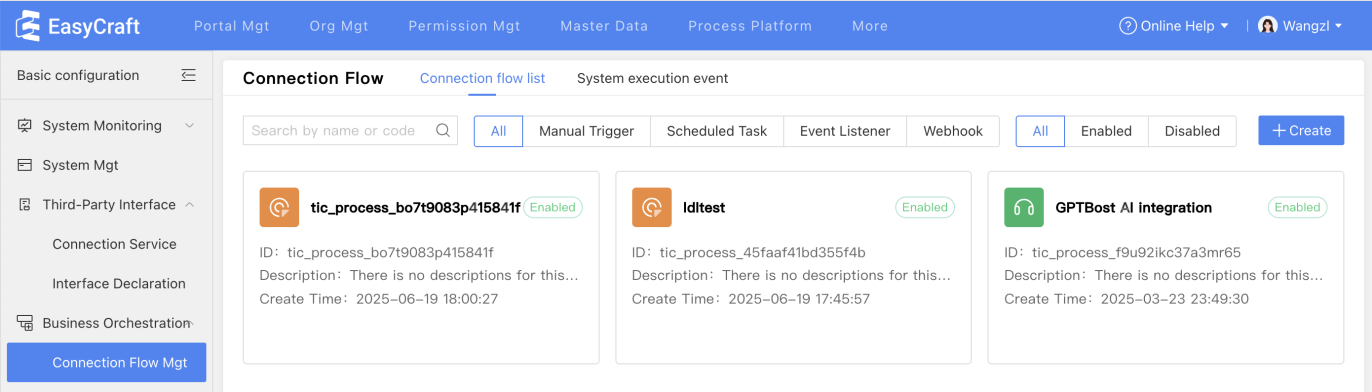
Execution Log: Hover the mouse over the "..." icon to expand the pull-down list, where users can find execution log, basic settings, export and disable. Click "Execution Log" to open the execution records.
To view log details, click the log record to open the details page, which displays the input and output parameters of the log interface.
After viewing the records, click the "Return" button on the upper-left corner to return to the connection flow list.
Note: Users cannot change the connection flow type in the "Basic Settings" of a created connection flow, it can only be changed when the connection flow is being created.
Disable/Enable: Hover the mouse over the "..." icon of an enabled connection flow, click "Disable" in the pull-down list to disable the current connection flow. Users can enable connection flows likewise.
Delete: Hover the mouse over the "..." icon of an disabled connection flow, click "Delete" to perform the deletion. (Only disabled connection flows can be deleted)