2.4-numbering-settings
2.4 Numbering Settings
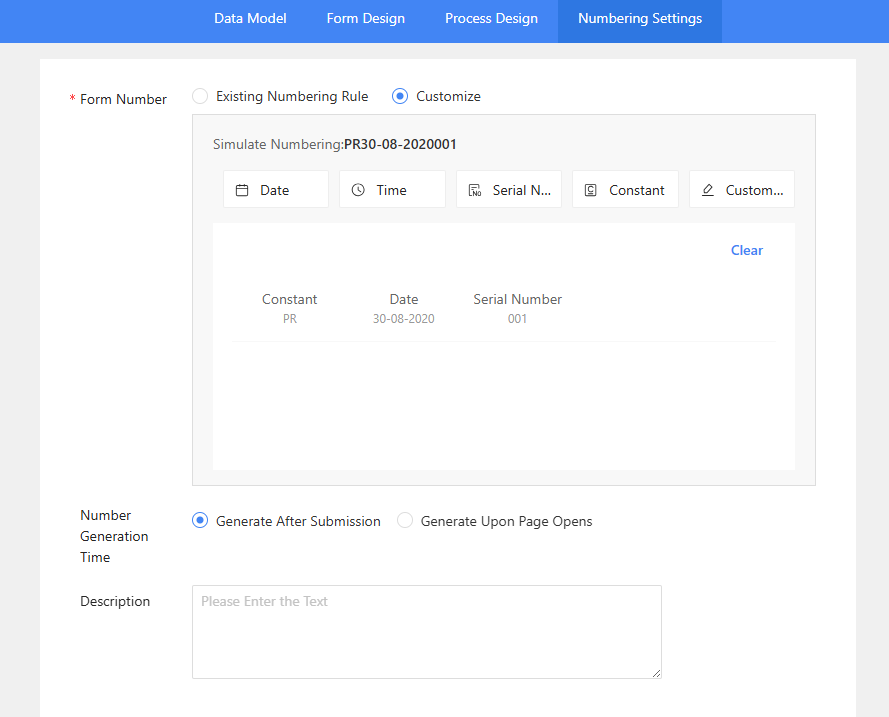
This section allows you to configure how form numbers are generated.
Form Number
This is a required field for determining the numbering convention.
- Existing Numbering Rule: Select this to use a pre-defined rule from the dropdown menu. In the example, Process_general_num_rule is chosen.
- Customize: Select this to create a custom numbering rule.
Number Generation Time
This setting determines when the form number is assigned.
- Generate After Submission: The number is assigned only after the form has been submitted.
- Generate Upon Page Opens: The number is assigned as soon as the form page is opened by a user.
Description
You can enter optional descriptive text about the numbering configuration in this text box.
To configure the numbering settings, follow these steps:
-
Numbering Settings
Click the “Numbering Settings” on the top
To create a unique numbering format for a form, select the Customize option.
You can construct a custom number by adding different elements:- Click Date to add a date component.
- Click Time to add a time component.
- Click Serial Number to add a sequential number.
- Click Constant to add fixed text.
- Click Customize to add other custom fields.
The Simulate Numbering field displays a live preview of your form number as you build it. The table below the buttons shows the specific components currently in use.
-
Finalizing Settings
After completing the numbering configuration, click the "Publish" button to save and apply your Process Template Settings.