3.7.3-process-data
3.7.3 Process Data
The Process Engine integrates with third-party systems to enable data flow across multiple forms and systems, ultimately implementing end-to-end process integration. If the MK process engine attaches with forms built in the system, then we can see those data fields in “Designed Forms.”
But when connecting with third-party systems, the MK process engine does not provide corresponding forms nor store data, so all business data required for process execution is retrieved in real time from third-party systems. Therefore, during the design of the process template, we must configure data field mappings between the process template and third-party system APIs during template creation. These mappings enable automatic data retrieval from connected systems during process execution.

Figure 3.7–14 Process Data Page
3.7.3.1 Process Variables
Process Variables are dynamic data containers used within workflow automation systems to capture, store, and transfer context-specific information throughout a process instance. They act as the "memory" of a workflow, enabling:
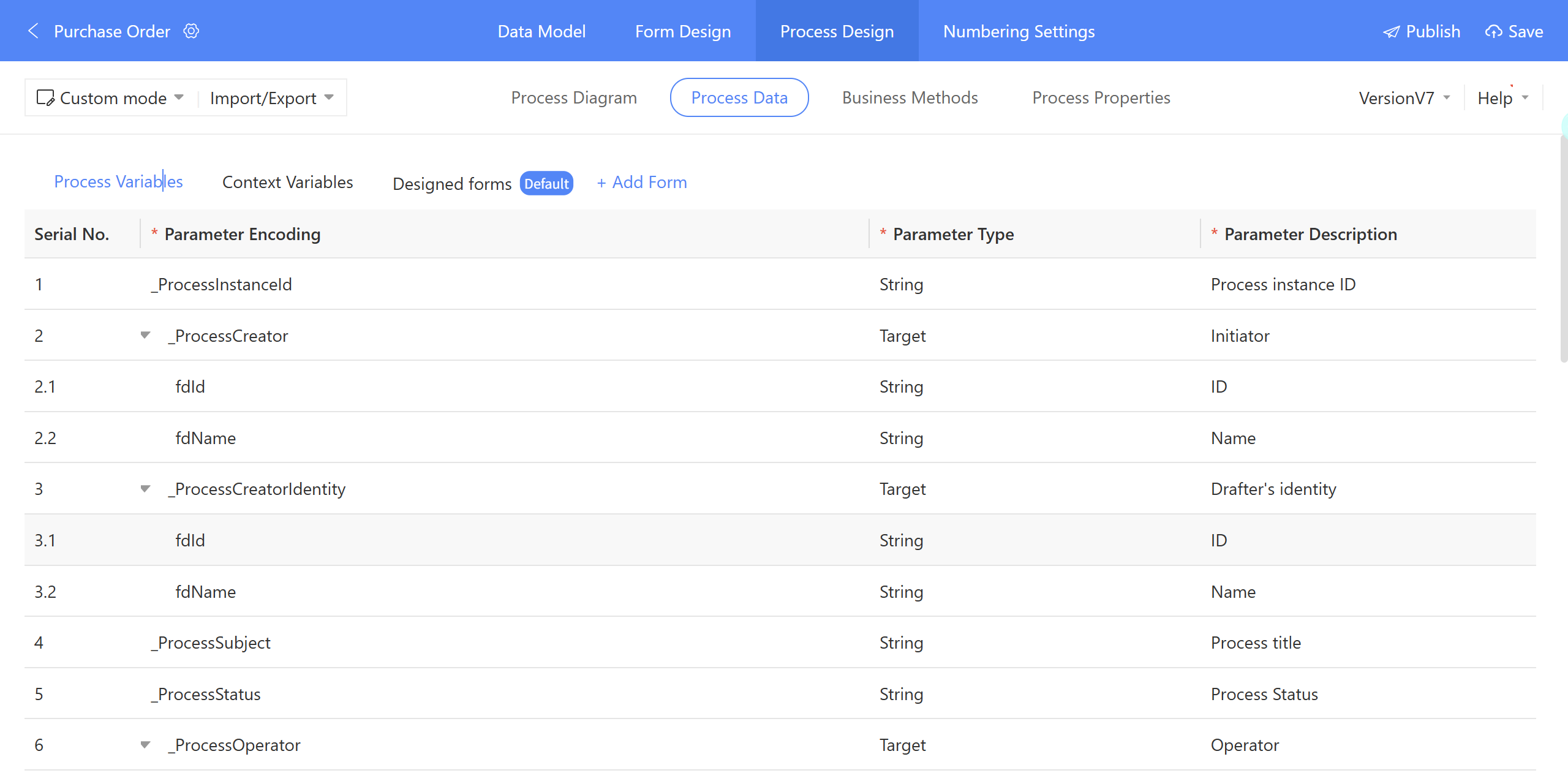
- Contextual Decision-Making: Execute logic based on real-time process data (e.g.,
_ProcessStatus = "Rejected"→ trigger a notification). - Audit Trails: Record critical metadata (e.g., who initiated the process, when, and under what title).
- Cross-System Integration: Pass data between systems (e.g., sync
_ProcessCreatordetails to CRM). - User Interface Customization: Dynamically render forms or approvals using variable values.

Figure 3.7–15 Context Variable in Process Data
Key Characteristics:
- Temporary: Exists only during the process runtime and is cleared after completion.
- Dynamic: Can be updated in real-time based on external inputs or intermediate calculations.
- Cross-System Compatibility: Enables data exchange between external systems and the process engine when direct integration is restricted.
Common Use Cases & Examples:
1. Bridging External Data to a Process Form
Scenario:
Your process needs to use a field value from an external database (e.g., a customer’s ID from Salesforce), but the target form in your system cannot directly read from Salesforce.
Solution:
- Fetch the customer ID from Salesforce via an API.
- Store it in a Context Variable (e.g.,
customerID_from_Salesforce). - Pass this variable to the process form for further processing (e.g., auto-populating a field).
Why?
The Context Variable acts as a temporary "holding area" to circumvent direct integration limitations.
2. Dynamic Branching Based on External Conditions
Scenario:
A process must decide whether to approve a request based on a field value (e.g., "Risk Score") from an external risk assessment tool, but the process engine cannot query this tool directly during runtime.
Solution:
- Retrieve the "Risk Score" from the external tool beforehand.
- Store it in a Context Variable (e.g.,
RiskScore). - Use this variable in a conditional branch (e.g., "If RiskScore > 70, route to manager approval").
Why?
The Context Variable decouples the process from external system dependencies during execution.
3. Staging Data for Multi-Step Processes
Scenario:
A process involves multiple teams (e.g., Legal + Finance), and each team adds data (e.g., contract terms, budget approvals) in different forms that must be consolidated before final submission.
Solution:
- Store each team’s input in separate Context Variables (e.g.,
legalTerms,financeApproval). - Aggregate these variables into a final form for a consolidated document or database entry.
Why?
Context Variables ensure data consistency and availability across non-sequential steps.